You saw that stunning aerial video — camera slowly panning over a waterfall or a city at night — and thought: "I want to do that." You're not alone. More and more people are getting into the drone market with that same spark, but without knowing where to start. And then comes the classic dilemma: do I buy something cheap and regret it, or blow a fortune on gear I'll never use to its full potential?
The good news is there's a very reasonable middle ground, and this article will help you find it. No need to understand electronics or memorize technical specs from a manual. Just what you need to know to walk into a store — physical or online — and make a decision you won't regret.
Why most people buy the wrong drone
The most common mistake is buying based on price or looks. That tiny $40 drone seems great until you try flying it on a mildly windy day and watch it drift off toward your neighbor's yard. On the flip side, the guy who jumps straight to a $2,000 professional model often barely takes it out of the box, too afraid of crashing and losing everything.
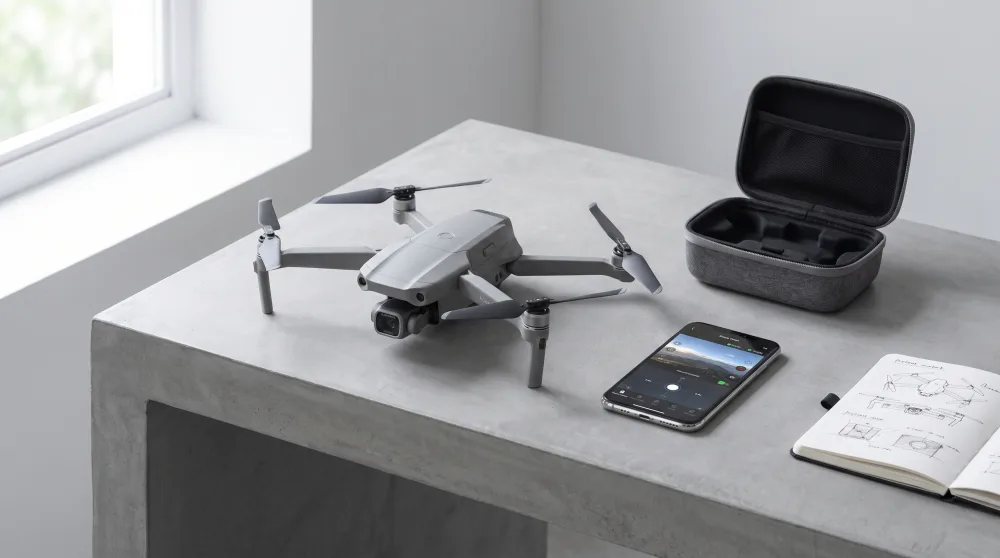
The second mistake is ignoring the most important question: what are you going to use it for? Recording trips? Filming family events? Photographing properties for real estate listings? Each use case calls for a different type of drone. A travel drone needs to be light and foldable. One for real estate needs a solid camera and decent stabilization. Knowing this before you buy saves both money and frustration.
What actually matters in a drone camera
Everyone focuses on resolution — megapixels, or whether it shoots 4K — but a drone camera has other factors that have a bigger impact on the final result. The most important is the gimbal, which is essentially a mechanical mount that keeps the camera stable while the drone moves. Think of it this way: have you ever tried recording a video while walking fast with your phone in your hand? It came out shaky. The gimbal acts as a "steady hand" for the camera, compensating for the drone's movement in the air.
Very cheap drones — under $100 or so — typically don't have a gimbal. Instead, they use a digital system called electronic image stabilization, which is far more limited. The result looks like footage shot inside a washing machine. If you want to record anything you'd actually want to show other people, a two- or three-axis gimbal makes a visible difference.
Another important factor is the camera's sensor size. The same logic applies here as with smartphones: larger sensors capture more light, which means better images when lighting isn't ideal — late afternoon, overcast days, shadowed areas. You don't need to memorize the technical numbers. In practical terms: entry-level drones like the DJI Mini 2 SE already have acceptable sensors. Mid-range models like the DJI Mini 4 Pro step up to noticeably better image quality.
Battery life: the part almost every review forgets to explain properly
Manufacturers say "up to 34 minutes of flight time." In real life, you'll get somewhere around 20 to 25 minutes under normal conditions. Add wind, cold temperatures, or high-speed flying, and it drops even further. That's not false advertising — it's just physics.
What most people don't tell you is this: an extra battery costs anywhere from $40 to $120 depending on the model, but it completely transforms your experience. Instead of stopping everything and waiting 60 to 90 minutes for a recharge, you just swap it out and keep flying. If you plan to use your drone on trips or to film events, buy at least one spare battery along with the drone. Many retailers sell "Fly More" combo kits that include two or three batteries at a discount. They're absolutely worth it.
A practical tip: always check how long it takes to recharge the battery for the specific model you're looking at. Some newer drones support fast charging. Others are as slow as charging an old phone with a 5W brick. That detail makes a real difference on a day out.
How much to spend: price ranges and what each one gets you
I'll be straight with you here, because there's a lot of overblown marketing at both ends of the market.
Under $100: for playing around and learning
In this range, a drone is basically an educational toy. It works for learning to fly, getting comfortable with the controls, and figuring out whether you're genuinely interested in the hobby. The camera is weak, stabilization is electronic (no mechanical gimbal), and the range is short. Don't expect to capture anything you'd be proud to show off. Common examples in this range include generic no-name drones — they work, but customer support is practically nonexistent.
$300 to $700: the sweet spot for serious beginners
This is where you'll find the best value for your money. The DJI Mini 2 SE sits around $300 to $400 and is honestly the drone I'd recommend for anyone starting out with a genuine intention to use it. Three-axis gimbal camera, 4K video, weighs under 249 grams (which significantly simplifies registration requirements — more on that in a moment), and the remote controller is included. If you want to step it up a notch, the DJI Mini 3 or Mini 4 Pro offer visibly better image quality and run between $500 and $700.
Above $1,000: for professional use
Models like the DJI Air 3 or the DJI Mavic 3 are built for professional aerial photography, event coverage, and commercial content production. The camera quality approaches that of cinema-grade equipment — in aerial form. If you're not sure you'll use it regularly and for paid work, there's no reason to start here.
Regulations: what you need to know before flying in the US
This is the topic most people ignore — and most people later wish they hadn't. In the United States, the FAA (Federal Aviation Administration) regulates drone use. This isn't red tape for the sake of it: it's designed to prevent accidents involving manned aircraft and people on the ground.
The most important rule for beginners involves weight. Drones under 250 grams have a much simpler registration process. That's a big reason why the DJI Mini 2 SE is so popular — it weighs 249 grams, right under that threshold. Drones at or above 250 grams must be registered with the FAA, which is straightforward and costs $5, but it's a required step.
Beyond weight, there are rules about where you can and can't fly. Airspace near airports and helipads is restricted (and the drone's app will warn you automatically). National parks, large gatherings of people, and densely populated urban areas have specific restrictions. The Airmap app or the DJI app itself shows a real-time map indicating where flight is permitted, restricted, or prohibited. Always check before you take off.
Flying without following the rules can result in fines and equipment confiscation. It's not worth the risk.
Questions every beginner has before buying
Do I need a license to fly a drone?
For recreational use, you don't need a pilot's license. But you do need to follow FAA rules and register your drone if it weighs 250 grams or more. If you plan to fly commercially — meaning you're getting paid for photos or videos — you'll need to pass the FAA's Part 107 knowledge test and obtain a Remote Pilot Certificate.
Is DJI the only brand worth considering?
DJI dominates the consumer market for good reason: the apps are intuitive, support exists, parts are accessible, and image quality is consistently solid. There are alternatives like Autel Robotics with some interesting models, but DJI still leads when it comes to ease of use, image quality, and availability of service and support.
Should I buy locally or order online?
Buying from an authorized US retailer gives you a warranty, a receipt, and local support — with no customs headaches. Ordering from overseas might look cheaper, but if the drone arrives defective or gets held up at customs, the hassle is significant. For beginners, buying from established retailers — whether in-store or through sites like Amazon.com or B&H Photo — is the safer, smoother path.
What to do next
If you've made it this far, you're already well ahead of most people who buy a drone on impulse. The next practical step is simple: decide what you'll use it for (travel? family moments? real estate?), figure out your actual budget (what you can spend without stressing about it), and go with the price range that fits. If the budget allows, the DJI Mini 2 SE with an extra battery kit is an excellent starting point for anyone who's serious about getting into this hobby.
Before your first flight, download DJI Fly and Airmap, check the airspace in your area, and complete your FAA registration if your drone requires it. Flying by the rules isn't just bureaucracy — it's what keeps this hobby accessible for everyone.